The Linear Cohesion V2 model
Similar to the Linear Cohesion model, this modifies the Base Contact Model by adding a normal cohesion force. This force is described as follows:

where A is calculated as follows:

However, in the “Linear cohesion V2” model, the radius of overlap squared is calculated as follows:

where R1 and R2 are the radius of the particles in contact. In the case where the element 2 is a geometry.

k is a cohesion energy density with units Jm-3.
This means that, for the same input parameters, the ratio between the forces calculated with “Linear cohesion V2” (FV2) and “Linear Cohesion” (F) model will be as follows:
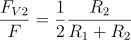
For the case of a uniform particle size distribution:
.svg)
In this case, the cohesive force calculated in the Linear Cohesive V2 model is therefore four times smaller than the one calculated in the Linear Cohesive model (for a uniform particle size distribution).
In cases where the element 2 is a geometry, the force is two times smaller as follows:
.svg)
| Interaction | Configurable Parameters | Position |
| Particle to Particle, Particle to Geometry | Click + to add cohesion to particle-particle or particle-geometry interactions. Set the energy density for each interaction. Energy density is the scaling function for the cohesiveness of the material. The SI units of energy density are J/m³. | Any |
-
Select Edit Contact Chain > Additional models and then select Linear Cohesion V2.
-
Click the configuration
 icon to define contact model parameters.
(c) 2023 Altair Engineering Inc. All Rights Reserved.