Defining Dynamic Domain Conditions
A particle excluded from any calculation is called a frozen particle. If a frozen particle re-enters the dynamic domain then it is automatically included in the calculations again.
To use this feature, a geometry section, you must first define as a Dynamic Domain in the Creator. To do this, right- click the Geometries section, select Add Geometry and select Box. Rename the new geometry and set the Type to Dynamic Domain.
Next, set the dimensions of the Dynamic Domain Object suitable for the simulation, any material inside the domain will be active and any outside may become frozen.
Frozen particles do not apply forces on geometry sections.
Frozen particles are excluded from Contact Detection, forces and velocities are not computed.
Freezing Conditions
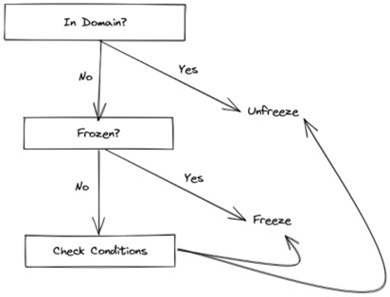
When Dynamic Domain is enabled, particles are frozen or unfrozen at the start of each Time Step according to the following flowchart:
Dynamic Domain Settings
Starting State
This option describes the initial particle state when the simulation is started:
- Unfreeze all Particles
This is the default behavior. All particles are initially unfrozen. - Freeze all Particles outside of Dynamic Domains
Particles not inside a Dynamic Domain geometry are frozen, all other particles are unfrozen. - Preserve current particle states
When continuing a paused simulation, restore the prior frozen state. Otherwise, particles are initially unfrozen.
Particle Freeze Conditions
As shown in the flowchart, the Check Conditions stage freezes a particle if that particle matches one or more of the enabled Particle Freeze conditions.
- Basic Freeze Condition
This is the default freeze condition. It is recommended as a conservative option to only freeze particles that have definitely settled. Particles will only be frozen if they have moved less than the specified amount after the given number of checks. - Distance from dynamic domain is greater than ___
This will freeze particles as soon as they reach a certain distance away from the boundaries of the Dynamic Domain. - Particle velocity is slower than ___
This will freeze particles as soon as their velocity drops below the given value.
Maintain Frozen Contact History
This provides the option to discard contact history when a particle is frozen. If the contact history is not needed for analysis, this can be used to reduce the file size of the simulation.
Dynamic Domain is based on the Method outlined in Mio et al., 2009.
(c) 2023 Altair Engineering Inc. All Rights Reserved.