Loading a Deck
The deck should be set up in such a way that they can all be run from the command line. The Load Deck is the first page in EDEMCal.
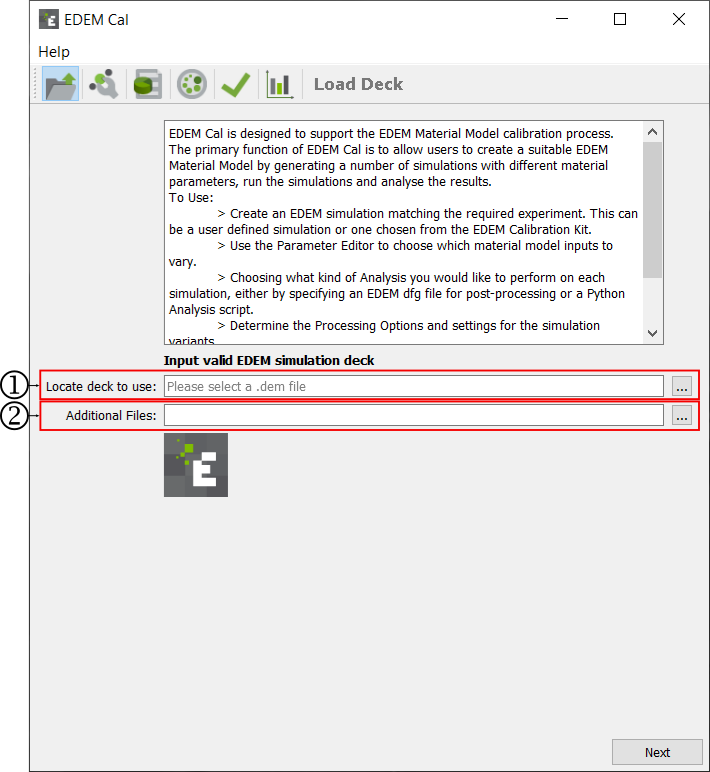
-
Specify the path to the EDEM deck.
-
Select the additional files required to run the simulation.
Selecting an EDEM deck
The .dem file associated with the EDEM deck must be used for EDEMCal. This can be written or pasted into the box or found through the windows explorer interface. To find the file in windows explorer, click .... Navigate to the deck and select Open. This will populate the box with the path to the .dem file.
Additional Files
Any additional files required to run the simulation from the command line must be selected. When importing multiple additional files - highlight multiple files in file explorer and then add. Example additional files include coupling scripts, preference files and API .dll or .so files.
(c) 2023 Altair Engineering Inc. All Rights Reserved.