The EDEM Cal Utility
EDEM Cal is a utility which works with EDEM and is designed to assist users in performing calibration. It removes manual steps from setting up and running multiple EDEM simulations. EDEM Cal can create and submit parameter space searches automatically. EDEM Cal collates automated results from EDEM analysis and supports the use of EDEMpy scripts to obtain results, significantly reducing engineering time needed. At the moment EDEM Cal is a windows only application, but can generate a batch job for Linux.
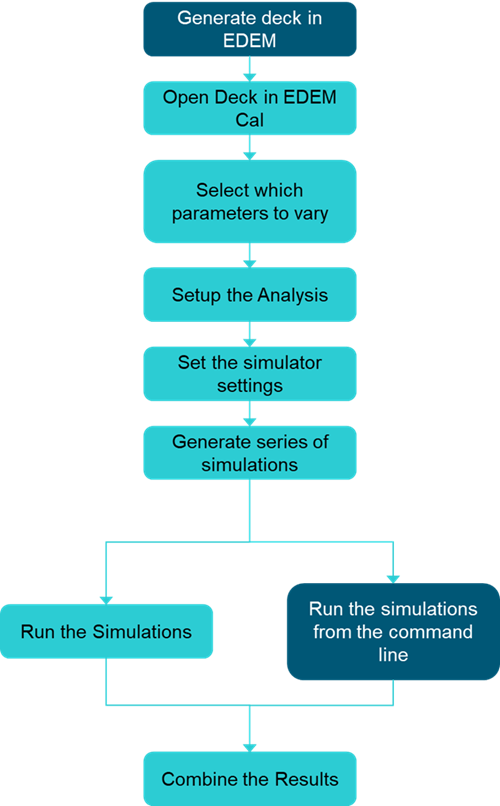
The workflow for EDEM Cal is as follows:
EDEM Cal Interface
The interface in EDEM Cal consists of a Menu bar (1) and a Toolbar (2), indicated in figure 1.
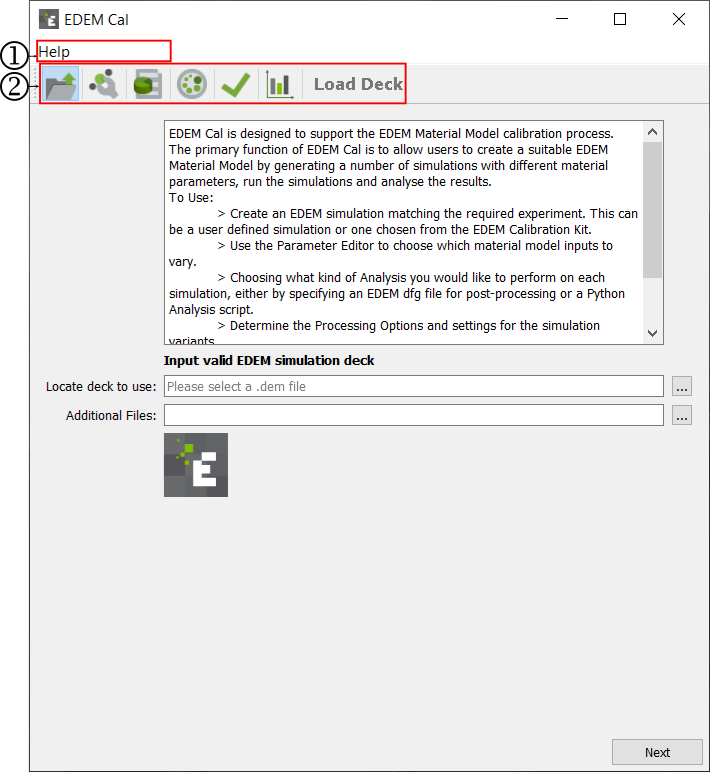
The Menu bar contains:
- Help: Shows the details of the EDEMCal software
The Toolbar contains icons to change the User Interface to generate EDEM simulations, execute the simulations and compile the results. To find out more about each one, click on the corresponding text in the action column as follows:
|
Icon |
Action |
|
|
|
|
|
|
|
|
|
|
|
|
|
|
|
|
|


