booleanOutside
This command select the surfaces of the first object that are not contained in the second one (A outside B operation).
Inline mode usage:
- booleanOutside -h
- Displays the help file that summarizes the parameters for this command.
- booleanOutside –s –objectA <list of names A> -objectB <list of names B>
- Draws the parts of the surfaces listed in A that are not contained in B.
Interactive mode usage:
- Invocation
- booleanOutside
- Parameters
-
- Surfaces of the 'objectA' selection of surfaces and objects of the first object.
- Surfaces of the 'objectB' selection of surfaces and objects of the second object.
Example:
Suppose we have the following open cone and box in the geometry:
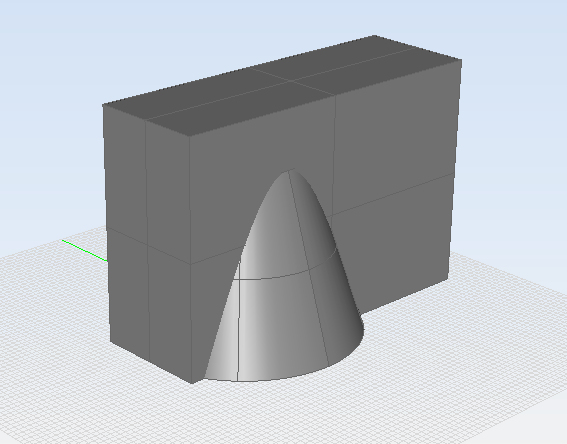
Figure 1. Initial state of the geometry for the booleanOutside command
These objects can be created by running the following
commands:
command> coneSelect center [x y z]: 0 0 0Bottom radius [double]: 2Height [double]: 3Top radius [double]: 1command> boxFirst corner of base [x y z]: -2 -1 0Base size [width depth]: 6 2Height [double]: 4command>Let's assume we want to obtain the part of the surfaces of the cone that are outside the
region enclosed by the box. To achieve this, we need to run the booleanOutside command
in the following
way:
command> booleanOutsideSelect the surfaces of the 'objectA' on screen (Press enter when done) (Select the cone)Select the surfaces of the 'objectB' on screen (Press enter when done) (Select the box)Please Wait...command>As usual, if the cone and the box had the names "myCone" and "myBox" respectively, the command could also be run in the following way:
command> booleanOutside -s -objectA myCone -objectB myBoxPlease Wait...command>The final result is shown in the following figure:
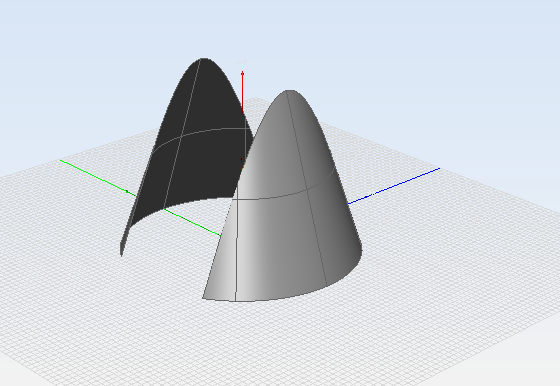
Figure 2. State of the geometry after the booleanOutside operation