Meta Particles
A meta-particle is a collection of individual Multi-Sphere or Sphero-Cylinder particles bonded together using EDEM’s Bonding V2 contact model. The meta-particle feature allows the user to create flexible fiber/materials.
Creating a Meta-Particle
Right click on Bulk Material and select Add Meta-Particle, this will create a new Meta-Particle. Alternatively press Ctrl+Alt+P or  in the toolbar.
Right clicking on the newly created meta-particle will give the following options:
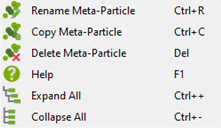
- To define a Meta-Particle, in the Creator Tree > Bulk Material > select the newly created meta-particle. The following empty dialog box should appear. Right click and select Add Particle. Repeat this to add the required number of particles for the desired Meta-Particle.
Under Particle Type, in the drop-down menus select the particles that are to make up the desired Meta-Particle.- To add, remove or copy a particle from the setup the following icons can be used respectively, ,
 ,
,  .
. - Any combination of different particles can be used to form meta-particles (this is not restricted to the same Bulk Material).
- Any arrangement that allows bonding upon creation can be used.
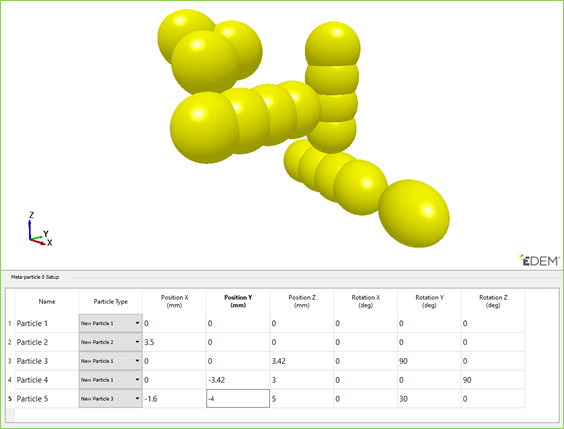
- To add, remove or copy a particle from the setup the following icons can be used respectively,
- Arrange the particles using the X, Y, and Z positioning and rotation coordinates so that the particles are next to each other with minimal overlap or separation
- If the particles are significantly overlapping, they will repel when the meta-particle is created and break apart.
- If the particles are spaced too far apart, they will not bond with each other upon creation and the meta-particle will not form correctly.
The  button highlights the particle, which is currently being edited, whichever particle is active in the table will be highlighted red.
NB. When using the Meta-particles in conjunction with the bonded model it is necessary to define the contact radius. When two contact radii overlap (as they will when setting up a meta-particle) this allows a bond to be formed between the particles.
The contact radius is advised to be 110% to 120% the size of the particle radius.
The larger to the contact radius, the more contacts that will be detected by the model, this will cause the simulation time to slow. A large contact radius of ~ 120% of the physical radius is only recommended for very flexible material to make sure breakage does not occur during bending.
Note. Multi-GPU factories will not generate Meta-Particles which cross the boundary between two GPUs. This will affect the random nature of particle generation.