


|
Data Extracts Toolbar and Context Menu
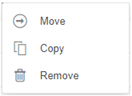
Moving, copying, and removing data extracts can either be done using:
q Context menu
q Toolbar
List View:

Grid View:

The Data Extracts toolbar options include:
|
Toolbar Option |
Description |
|
Allows sorting data extracts by Name, Last Modified, or Connector. |
|
|
Display data extracts either by List View or Grid View. |
|
|
Copy data extracts to another folder or subfolder where the user has permission. |
|
|
Move data extracts to another folder or subfolder where the user has permission. |
|
|
Remove data extracts. |
The Context Menu options include:
|
Toolbar Option |
Description |
|
Copy data extracts to another folder or subfolder where the user has permission. |
|
|
Move data extracts to another folder or subfolder where the user has permission. |
|
|
Remove data extracts. |