Min Via Spacing
Check different clearances between Vias.
Depending on usage of Vias, you can define different clearances.
-
Under Target Objects Definition, define target vias.
- Select vias in Pattern Routing to target Vias in routing pattern.
- Select Mechanical Via to target Vias not connected to routing pattern.
-
Under Checking, define checking items.
-
If target Vias are routing Via, select Clearance between
Same Net’s connected Vias to check the clearance between
Vias in same net.
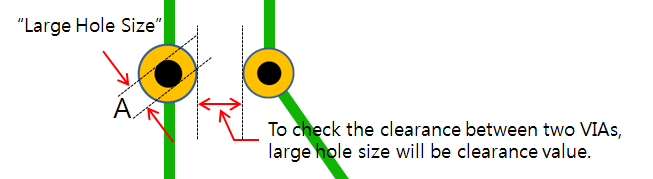
Figure 1.- Small Hole Size: While check the clearance between two Vias, use the clearance value with the small Via hole size.
- Large Hole Size: While check the clearance between two Vias, use the clearance value with the large Via hole size.
-
If target Vias are routing Via, select Clearance between
Same Net’s connected Vias to check the clearance between
Vias in same net.